Purchase & Store
Every rupee spent passes a gate before it is committed.
- Budget block on create and approve
- Rate contracts auto-apply the agreed price
- Supplier scorecard from real delivery data

Construction ERP · Multi-tenant SaaS
Purchase to payroll, site to factory — one system, every approval, every rupee traceable. Built for contractors and developers who run more than one site, and it keeps working on site even when the network does not.
Runs on your own server · Your data never leaves your control
Your day, live
Dawn to noon to dusk — then the moon takes over. The sky above this spinning Earth tracks the real clock, wherever in the world you open it.
See it in action
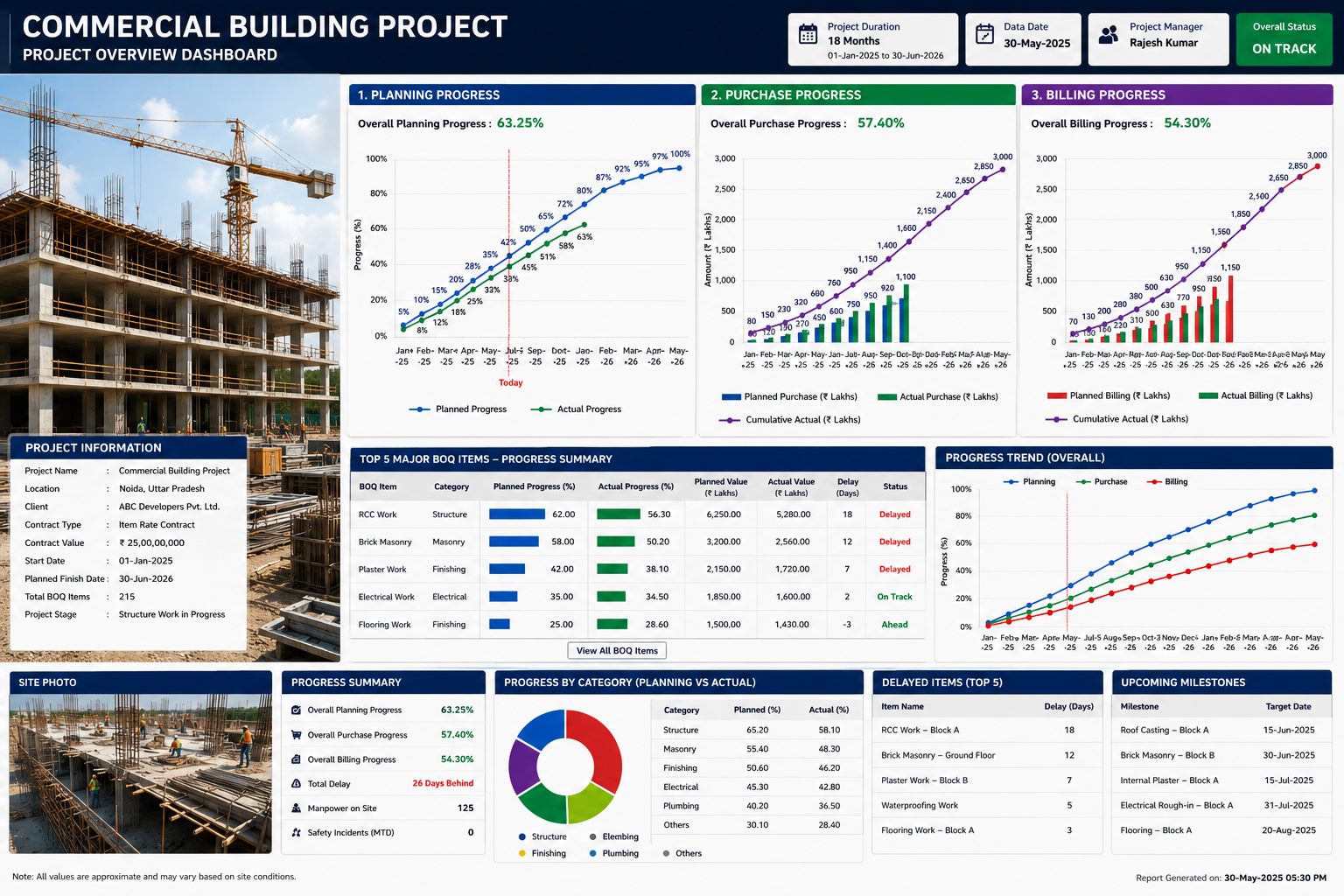
Planning, purchase and billing progress side by side — the picture a CMD actually wants to open in the morning.

“The BOQ said 5,000 sft. Somehow 6,200 got billed.”
Quantity leak
“The PO was approved for ₹2 crore. The final spend was ₹2.4.”
Budget leak
“Material left the store. Nobody can say where it went.”
Material leak
Every one of them is a control problem, not an accounting problem. CivorraOne closes the gate before the number can move — not after.
What the leak costs
Drag to your yearly project value. These are typical industry ranges — the exact figure is what a demo puts on the table.
CivorraOne closes the gate before these numbers can move. Recovering even a third of it pays for the system many times over.
See it on your numbers →Indicative industry benchmarks, not a quote — actual leakage varies by project and controls in place.
Three pillars
Every rupee spent passes a gate before it is committed.
Know the delay before it becomes a delay.
Quantity can never be billed twice or over-billed.
Watch it run
Planning, purchase and billing — the same live panels your team opens every morning, cycling one by one in 3D. MSP-grade schedule, budget gate, cumulative RA bill. Not a slideshow.
Cumulative quantity is capped at the work order line — over-billing is blocked at source, not caught later.
Everything included
Every floor is a suite — purchase to payroll, site to factory. Tap a floor to pull it out, drag the tower to turn it. Licensed module-wise: start with one floor, add the rest when you need them.
Drag to turn · tap a floor
Take a break
Built the same way the whole site is — pure canvas, zero libraries. Pick one and play right here.
Steer with the mouse · click to drop a floor or plug a leak · nothing to install.
How it works
Control & governance
Every company defines its own chain — by module, by project, by amount band. Delegations are dated and logged.
IT Admin configures the system but is hard-blocked from approving any business transaction. The engine enforces it.
Stock movements can never be edited or deleted. Corrections are adjustment entries, so history stays true.
Who did what, from which IP, at what time — on every action, across every module.
Per-company numbering with financial-year reset. No duplicate document numbers, ever.
Bulk upload everywhere — with a preview that shows exactly which row failed and why, then imports only the good ones.
A full, consistent snapshot of every table, every day — without stopping the server. The screen shows when the last one ran and warns if one fails.
DPR and GRN are saved on the phone and sent the moment the network returns — each entry carries its own number, so it is never recorded twice.
Why not just…
One tool that actually knows what a BOQ, a work order and an RA bill are — and stops the number before it moves.
| Capability | CivorraOne | Spreadsheets | Generic ERP | MSP / Primavera |
|---|---|---|---|---|
| Blocks over-billing vs BOQ | Yes | No | Add-on | No |
| Budget gate on PO create & approve | Yes | No | Partly | No |
| Immutable material ledger | Yes | No | Partly | No |
| CPM schedule + DPR in one system | Yes | No | No | Schedule only |
| Cumulative RA bills in the real format | Yes | Manual | No | No |
| Per-company approval matrix | Yes | No | Rigid | No |
| Site entry without network (no duplicates) | Yes | Paper | No | No |
| 13-week cash-flow from live bills | Yes | Manual | Add-on | No |
| WhatsApp with delivered / read status | Yes | No | Add-on | No |
| Runs on your own server | Yes | Local files | Vendor cloud | Desktop |
| Licensed module-wise | Yes | — | All-or-nothing | Seat-based |
Comparison reflects typical off-the-shelf offerings; specific products vary.
Deployment & security
CivorraOne runs on your own VPS or on-premise machine. There is no third-party cloud in the middle, no data sharing, and no vendor holding your project history hostage.
From the site office
The over-billing block alone changed how our RA bills go out. The quantity simply can’t cross the work order any more — the argument is over before it starts.
We used to find budget overruns at the end. Now a PO that crosses the head is stopped at approval, and the CMD sees it the same day. That is the whole game for us.
Store to site was always a black hole. The ledger and reconciliation gave us the first honest picture of where material actually goes.
Build your plan
Licensed module-wise. Tick the suites that matter to your sites — we’ll scope a quote around exactly those, and you switch the rest on later.
Pricing
Module-wise licensing with limits on projects and users — start with one module, switch the rest on as you grow. Exact number against your scope in the demo.
One site, one team
from Talk to us
Multiple sites, running fast
from Talk to us
Whole portfolio, on your server
Talk to us
Limits and inclusions are indicative — we tailor the plan to your exact scope. Replace “Talk to us” with your own figures when ready.
Request a demo
Tell us a little about your company and we will walk you through the modules that matter to you — using a real project, not a slideshow.
We will call you within one working day.
Reference:
FAQ
A single-module start (say Purchase) is typically live within two weeks including masters setup and training. A full rollout across purchase, planning and billing usually runs four to six weeks, depending on how clean your existing BOQ and master data is.
Yes. Materials, suppliers, contractors, projects and BOQ quantities all import from Excel using a downloadable template. Every import shows a row-by-row preview so you can see exactly what will land before you commit it.
Site-level screens are deliberately narrow — a store keeper sees issue and receipt, a site engineer sees daily progress. Most site users are productive after a single session. Office roles need more, and we cover that during rollout.
The parts that differ between companies are already configurable without code: approval chains, document numbering, permission sets, units, tax slabs, budget and rate-deviation policies. Anything beyond that we scope separately.
Module-wise. You license only the modules you actually switch on, with limits on projects and users. If you only need Purchase today, you only pay for Purchase. Request a demo and we will put a number against your exact scope.
Yes, for the entries that happen on site — daily progress (DPR), goods receipt (GRN), material and labour arrivals and rain days. They are saved on the phone and sent automatically when the network returns. Every entry carries its own number, so even if the phone sends it twice (the reply got lost on a weak network) it is recorded exactly once — your stock never doubles.
Yes. With your own WhatsApp Business (Meta) account, purchase orders, payment-date promises to vendors and contractors, and any alert you choose go straight to the person’s WhatsApp — and the outbox shows whether each message was delivered and read. Without that account, the ERP still prepares a ready-to-send WhatsApp link.
It runs on your own server. Logins can require an authenticator app, a login from a new device alerts the user, credentials are encrypted, a full backup is taken automatically every day, and every action sits in an audit trail. Stock movements are immutable — mistakes are corrected with a visible reverse entry, never erased.
They keep working. Every bulk screen has a template download and an upload, and the RA bill and measurement book print in the same format your billing team already uses. The goal is to replace the risk in your spreadsheets, not the habits of your team.

Just for fun
Drag it around. Spin it. Tip it flat like a compass on the table. Built with nothing but CSS 3D transforms — same zero-dependency stack as the whole product.
Drag to rotate · double-click to reset · “Live” points to real north on a phone, or shows your location on a desktop